
Mzumbe E Learning Login – How to Access the LMS
Mzumbe E Learning Login: Complete Guide for Students and Staff
Introduction
Mzumbe E Learning Login is the official access point to Mzumbe University’s Learning Management System (LMS). It allows students and staff to access online courses, learning materials, assignments, and academic communication tools in one central place.
This platform matters because it supports flexible learning, timely access to course content, and smooth interaction between learners and instructors. Whether you are attending classes remotely or supporting blended learning, knowing how to use Mzumbe E Learning Login correctly saves time and avoids unnecessary frustration.
This article walks you through everything you need to know—from logging in and resetting your password to understanding the key services and features available on the platform.
What Is Mzumbe E Learning Login?
Mzumbe E Learning Login is the secure sign-in system for the Mzumbe University Learning Management System. Once logged in, users can:
-
Access enrolled courses
-
Download lecture notes and learning resources
-
Submit assignments and quizzes
-
Communicate with instructors and classmates
-
Track academic progress
The system is designed to be simple, reliable, and accessible from both desktop and mobile devices.
How to Access Mzumbe E Learning Login
To begin, you need an active university username and password provided by Mzumbe University.
Official Login Page
Access the platform directly using the official link below:
Always use this official link to ensure account security and uninterrupted access.
Step-by-Step Guide to Mzumbe E Learning Login
Follow these steps carefully to log in successfully.
Step 1: Open the Login Page
Visit the official Mzumbe E Learning Login page at:
https://elearning.mzumbe.ac.tz/
Step 2: Enter Your Username
Type your assigned university username in the Username field.
Step 3: Enter Your Password
Enter your password exactly as provided. Passwords are case-sensitive.
Step 4: Click “Log in”
Once your details are entered, click the Log in button to access your dashboard.

If your credentials are correct, you will be redirected to the Mzumbe University Learning Management System homepage.
Services Available After Mzumbe E Learning Login
After logging in, users gain access to a range of academic and support services.
Course Access
-
View all registered courses
-
Access lecture notes, slides, and reading materials
-
Watch uploaded learning videos
Assignments and Assessments
-
Submit assignments online
-
Participate in quizzes and tests
-
View deadlines and submission status
Communication Tools
-
Announcements from lecturers
-
Course discussion forums
-
Academic updates and notices
Academic Tracking
-
Monitor course progress
-
Review feedback and grades
-
Stay updated with course activities
Key Features of the Mzumbe University Learning Management System
The platform includes several useful features designed to support learning.
User-Friendly Dashboard
After Mzumbe E Learning Login, users see a clear dashboard showing enrolled courses and recent activity.
Mobile Access
The system supports mobile learning. Users can access courses through a mobile app for learning on the go.
Secure Data Handling
User data and course content are managed under defined data retention categories, ensuring responsible handling of academic information.
Multilingual Interface
The platform supports English and may offer language flexibility depending on system updates.
How to Reset Your Password on Mzumbe E Learning Login
If you forget your password, the system provides a simple recovery process.
Step-by-Step Password Reset
-
On the login page, click Lost password?
-
Choose to search by username or email address
-
Enter the required details
-
Submit the request
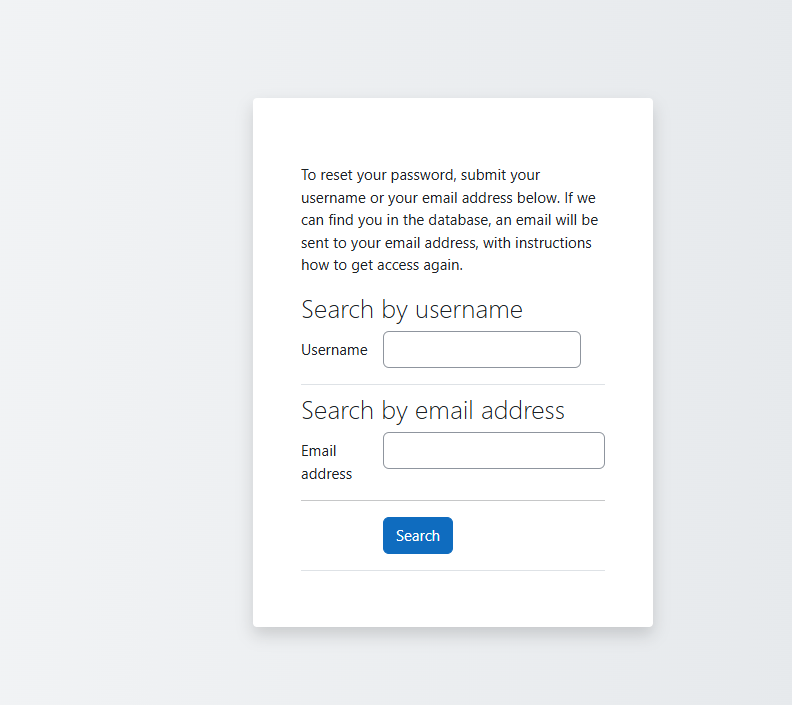
If your details are found in the system, instructions to reset your password will be sent to your registered email address.
Need Help With Mzumbe E Learning Login?
If you experience login issues, system errors, or access problems, technical support is available.
ICT Help Desk Support
-
Email: [email protected]
-
Website: http://helpdesk.mzumbe.ac.tz
The DICT Help Desk assists with login problems, password recovery, and general system support.
Additional Tips for Smooth Access
-
Always log out after using shared computers
-
Keep your password private and updated
-
Use a stable internet connection when submitting assignments
-
Check announcements regularly after Mzumbe E Learning Login
These small habits help prevent access issues and missed academic updates.
Frequently Asked Questions (FAQs)
Can I access Mzumbe E Learning Login without internet?
No. An active internet connection is required to use the platform.
What if my login details do not work?
Double-check your username and password. If the issue continues, use the password reset option or contact the ICT Help Desk.
Is the platform available on mobile devices?
Yes. You can access courses through a mobile-friendly interface and supported mobile apps.
Conclusion
Mzumbe E Learning Login is an essential gateway to academic life at Mzumbe University. It connects students and staff to courses, learning resources, assessments, and communication tools in one reliable system.
By following the steps and tips outlined in this guide, you can log in confidently, resolve common issues quickly, and make full use of the learning management system throughout your academic journey.