
TNMCIS Login: Steps for Registration, Renewal, and Verification
TNMCIS Login: Complete Guide to Registration, Licensing, and Verification
Introduction
The TNMCIS Login portal is the official online system used by the Tanzania Nursing and Midwifery Council (TNMC) to manage key professional services for nurses and midwives across the country. It plays a central role in registration, licensing, renewals, verification, and professional record management.
This article explains what the TNMCIS Login system is, why it matters, and how to use it effectively. By the end, you will know how to register, log in, apply for services, track your status, and avoid common mistakes when using the platform.
What Is TNMCIS Login?
The TNMCIS Login system is the Tanzania Nursing and Midwifery Council Information System. It is a centralized online platform designed to help nurses and midwives manage their professional requirements digitally.
The system was introduced to improve efficiency, transparency, and accountability in nursing and midwifery services. Instead of visiting offices in person, most applications and verifications can now be completed online through TNMCIS Login.
Who Can Use TNMCIS Login?
The TNMCIS Login platform is accessible to several groups, including:
-
Registered nurses and midwives in Tanzania
-
Newly graduated nurses and midwives
-
Healthcare employers and institutions
-
Nursing and midwifery training institutions
-
Authorized stakeholders conducting verification
Each user group sees options relevant to their role once logged in.
Key Features of TNMCIS Login
Online Registration
New nurses and midwives can create accounts and submit registration applications directly through TNMCIS Login.
Licensing and Renewal
Users can apply for new licenses, renew existing ones, and track the status of their applications online.
Verification Services
Employers and institutions can verify the registration and licensing status of nurses and midwives through the system.
Continuing Professional Development (CPD)
The platform allows professionals to record and track CPD points and related activities.
Application Tracking
Applicants can monitor progress, view updates, and receive notifications through their dashboard.
How to Register on TNMCIS Login
If you are a new user, registration is required before accessing services.
Step-by-Step TNMCIS Registration Guide
Step 1:
Visit the official TNMCIS portal:
👉 https://tnmcis.tnmc.go.tz/
Step 2:
Click the Register link located below the login form.
Step 3:
Select the appropriate application type, such as new registration or provisional registration.
Step 4:
Fill in all required details, including:
-
Personal information
-
Contact details
-
Educational qualifications
-
Required supporting documents
Step 5:
Review your information carefully and submit the application for processing.
After successful submission, you will receive login credentials once your registration is approved.
How to Access TNMCIS Login
Once registered, you can access your account anytime using the TNMCIS Login portal.
Step-by-Step TNMCIS Login Guide
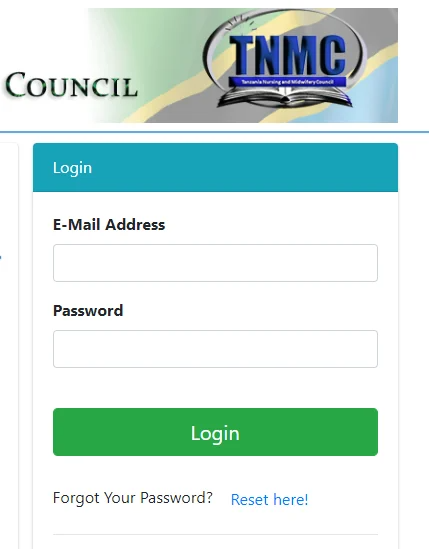
Step 1:
Go to the official TNMCIS Login page:
👉 https://tnmcis.tnmc.go.tz/
Step 2:
Enter your registered email or username and password.
Step 3:
Click Login to access your dashboard.
After logging in, you will see services and options based on your user profile.
TNMCIS Login Application Services
Through the TNMCIS Login system, users can apply for several important services:
Licensure Renewal
Required to maintain an active and valid professional license.
Provisional Registration
Designed for newly graduated nurses and midwives awaiting full licensure.
Temporary Registration
For foreign or visiting nurses and midwives working in Tanzania for a limited period.
Verification
Used by employers or institutions to confirm professional credentials.
Each application type has its own requirements and processing timeline, which are displayed during submission.
Guidelines for TNMCIS Login and Registration
-
New practitioners must complete registration before attempting TNMCIS Login.
-
Ensure all personal and educational details are accurate to avoid delays.
-
Registered users should log in using the credentials created during registration.
-
Always upload clear and valid supporting documents.
Help Desk and Support Information
Support is available during working days from 8:00 AM to 4:00 PM. Each application category has dedicated contact numbers.
Licensure Renewal, Provisional Registration, Temporary Registration, Verification
-
0758 589 706
-
0787 204 179
-
0744 377 830
-
0655 035 078
Licensure Examination, Indexing, Transcript
-
0628 583 890
-
0658 951 966
-
0744 377 830
-
0738 105 080
-
0653 003 800
Always contact the correct help desk number for faster assistance.
Additional Tips for Using TNMCIS Login
-
Save your login credentials securely.
-
Check your dashboard regularly for updates or requests.
-
Complete applications early to avoid last-minute issues.
-
Ensure your CPD records are updated before license renewal.
Conclusion
The TNMCIS Login system is an essential digital tool for nurses and midwives in Tanzania. It simplifies registration, licensing, renewals, verification, and professional record management through a single online platform. By understanding how the system works and following the correct steps, users can save time, reduce errors, and manage their professional responsibilities more efficiently.